
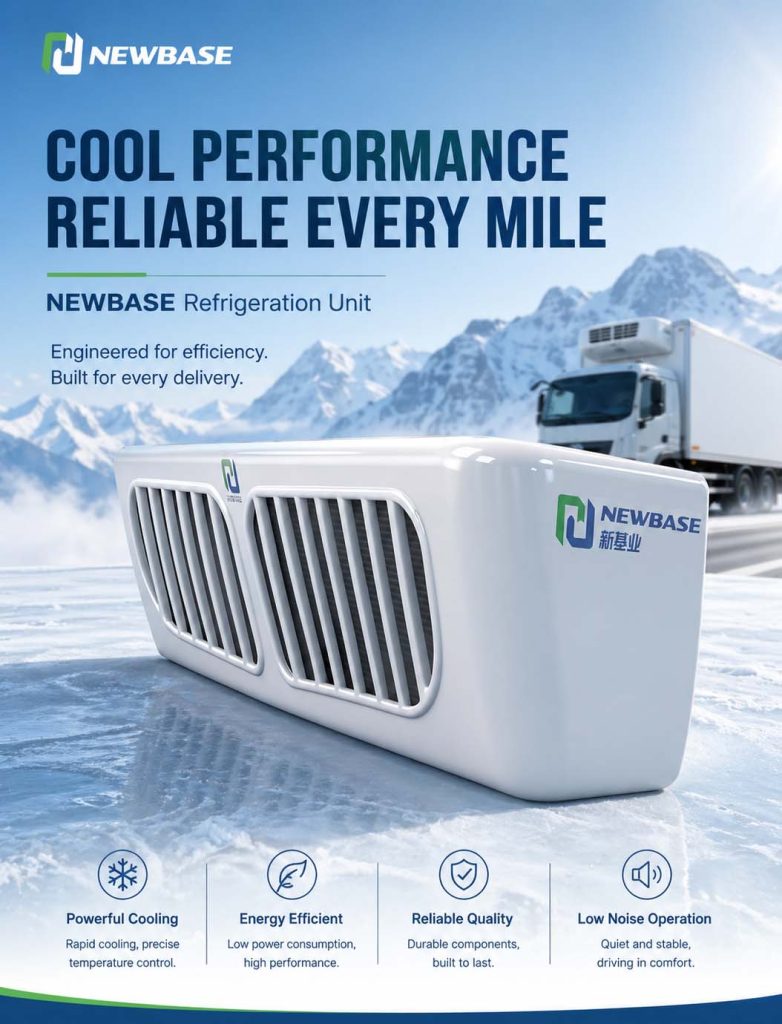
Por NEWBASE Technical Services Team | Publicado em 30 de abril de 2026 | 9 min read
O NEWBASE NBESR-1000A é uma peça de equipamento sofisticada, mas o seu desempenho final depende não só da sua conceção - mas também da forma como os operadores o utilizam. Mesmo o sistema de refrigeração mais avançado não pode compensar as más práticas de carregamento, o pré-arrefecimento inadequado ou as definições de temperatura incorrectas. Este guia de aplicação fornece orientações operacionais práticas para obter o máximo benefício da sua unidade NBESR-1000A, abrangendo procedimentos de pré-arrefecimento, melhores práticas de carregamento, recomendações de temperatura por tipo de carga e rotinas de manutenção essenciais.
1. Procedimentos de pré-arrefecimento
Porque é que o pré-arrefecimento é importante
O pré-arrefecimento é a prática de arrefecer a caixa de carga até à temperatura pretendida antes de carregar a carga. É a prática de maior impacto para manter a qualidade da carga: Sem pré-arrefecimento:
- A carga quente entra no veículo quente → tempo de tração prolongado
- Os artigos sensíveis à temperatura sofrem um abuso de temperatura durante o arrefecimento inicial
- O compressor trabalha à capacidade máxima → aumento do consumo de energia
- O arrefecimento desigual cria gradientes de temperatura na carga
Com pré-arrefecimento:
- A caixa de carga já se encontra à temperatura pretendida quando se inicia o carregamento
- A carga entra imediatamente em condições de armazenamento adequadas
- Menor exposição total a temperaturas elevadas
- Manutenção de uma temperatura constante em toda a carga
Procedimento de pré-arrefecimento do NBESR-1000A
Protocolo de pré-arrefecimento passo a passo:
1. Avaliação inicial
- Determinar a temperatura alvo para o tipo de carga - Avaliar as condições ambientais (temperatura exterior, humidade) - Verificar o estado operacional da unidade no ecrã do controlador
2. Iniciar o pré-arrefecimento (2-4 horas antes do carregamento)
- Ajustar o controlador para a temperatura alvo - Ativar o modo de arrefecimento de alta capacidade, se disponível - Fechar todas as portas durante o pré-arrefecimento - Verificar se o fluxo de ar está desobstruído dentro da caixa
3. Monitorizar o progresso do pré-arrefecimento
- Verificar regularmente o visor de temperatura - A plataforma IoT NBESR-1000A pode enviar alertas quando o ponto de regulação é atingido - Tempo típico de pré-arrefecimento: 2-4 horas, dependendo do ambiente e do tamanho da caixa
4. Confirmar o ponto de regulação atingido
- Verificar se o visor de temperatura apresenta a temperatura alvo - Permitir um período de estabilização de 30 minutos após atingir o ponto de regulação - Verificar vários sensores, se disponíveis, para um arrefecimento uniforme
5. Preparar o carregamento
- Organizar a sequência de carregamento para minimizar o tempo - Carregar primeiro os artigos mais frios para obter uma maior massa térmica
Estimativa do tempo de pré-arrefecimento
| Tamanho da caixa de carga | Temp. ambiente 25°C | Temp. ambiente 35°C | Temp. ambiente 40°C |
| 44 m³ | 2,2 horas | 2,7 horas | 3,2 horas |
| 46 m³ | 2,4 horas | 3.0 horas | 3,5 horas |
Os tempos pressupõem uma caixa vazia com um isolamento funcional
2. Procedimentos de carregamento corretos
Melhores práticas de carregamento
A forma como a carga é carregada tem um impacto significativo no desempenho da refrigeração: DO:
- Carregar a carga até ao nível recomendado: Não bloquear as grelhas de circulação de ar
- Utilizar cintas de catraca: Fixar a carga sem esmagar a embalagem
- Manter os canais de ar: Deixar intervalos de 5-10 cm para a circulação do ar
- Carregue primeiro os objectos mais pesados: Colocar no chão, na direção do evaporador
- Utilize paletes ou prateleiras: Elevar a carga para o fluxo de ar inferior
- Verificar a pré-qualificação da carga: Assegurar que a carga está à temperatura correta
NÃO O FAÇA:
- Bloquear a saída do evaporador: Nunca colocar a carga diretamente em frente do evaporador
- Sobrecarregar a caixa: Fluxo de ar reduzido significa arrefecimento reduzido
- Carregar carga quente: Permitir tempo para o pré-arrefecimento da carga antes do carregamento
- Deixar as portas abertas: Cada minuto de porta aberta acrescenta carga térmica
- Misturar cargas incompatíveis: requisitos de temperatura diferentes requerem zonas separadas
Estratificação da temperatura durante o carregamento
Mesmo os veículos corretamente carregados sofrem aumentos de temperatura durante o carregamento: Aumento de temperatura esperado durante o carregamento:
| Duração da abertura da porta | Aumento típico da temperatura | Tempo de recuperação |
| 5-15 minutos | 2-4°C | 30-45 minutos |
| > 15 minutos | 4-8°C | 45-90 minutos |
Minimizar o impacto da temperatura de carregamento:
- Trabalhar em cais de carga com temperatura controlada, quando disponível
- Pré-acondicionar toda a carga antes de abrir as portas do veículo
- Utilizar vedantes de docas para reduzir a infiltração de ar ambiente
- Carregar de manhã cedo ou à noite, quando o ambiente é mais fresco
Recomendação da sequência de carregamento
Ordem de carga óptima (para cargas de temperatura única):
1. Verificar se o pré-arrefecimento está concluído
2. Carregar primeiro a carga mais pesada/mais difícil
3. Colocar a carga mais próxima do evaporador em último lugar
4. Certifique-se de que nada bloqueia o fluxo de ar
5. Fecho rápido da porta após o carregamento
6. Verificar a recuperação da temperatura para o ponto de regulação
3. Recomendações para a regulação da temperatura
Tipo de carga Guia de temperatura
A gama de temperaturas do NBESR-1000A (-20°C a +15°C com aquecimento) cobre a maioria dos requisitos da cadeia de frio: Produtos congelados
| Produto | Temperatura recomendada | Notas |
| Marisco (congelado) | -20°C a -18°C | Armazenamento congelado mais comum |
| Carne (congelada) | -18°C a -15°C | Pode tolerar ligeiras variações |
| Legumes congelados | -18°C | Armazenamento a longo prazo |
| Alimentos preparados congelados | -18°C | Armazenamento padrão congelado |
Produtos refrigerados
| Produto | Temperatura recomendada | Notas |
| Aves de capoeira | 0°C a 2°C | Sensível ao abuso de temperatura |
| Produtos lácteos | 2°C a 4°C | A maioria dos produtos lácteos |
| Peixe fresco/marisco | -2°C a 0°C | Muito sensível à temperatura |
| Produtos frescos | 2°C a 8°C | Varia consoante o tipo |
| Bebidas | 4°C a 6°C | Bebidas não congeladas |
Produtos de temperatura fria
| Produto | Temperatura recomendada | Notas |
| Bananas | 13°C a 15°C | Extremamente sensível ao frio |
| Citrinos | 8°C a 12°C | Sensibilidade moderada ao frio |
| Tomates | 10°C a 15°C | Maturação sensível à temperatura |
Funcionamento do controlador NBESR-1000A
Temperatura de regulação:
1. Aceder ao painel de controlo: Localizar o controlador NBESR-1000A na cabina
2. Entrar no modo de menu: Seguir o procedimento específico do controlador
3. Selecionar a definição da temperatura: Navegar para o ajuste do ponto de regulação
4. Definir a temperatura pretendida: Utilize os botões +/- para ajustar
5. Confirmar a definição: Guardar e sair do menu
Utilização da função de aquecimento (6-15°C): A função de aquecimento do NBESR-1000A é activada para aplicações específicas:
- Selecionar o modo de aquecimento no menu do controlador
- Definir a temperatura alvo dentro do intervalo 6-15°C
- O sistema aquece em vez de arrefecer quando está acima da temperatura ambiente
Monitorização da temperatura
Durante o trânsito:
- Verificar a indicação da temperatura em intervalos regulares
- Registar quaisquer tendências ou variações de temperatura
- Comunicar imediatamente as anomalias
Utilização da plataforma IoT:
- A plataforma NEWBASE IoT permite a monitorização em tempo real
- Alertas automáticos para desvios de temperatura
- Registo completo da temperatura para conformidade
4. Práticas essenciais de manutenção
Inspeção diária antes da viagem
Os condutores devem efetuar estas verificações antes de cada turno: Inspeção visual:
- [Inspecionar o exterior da unidade quanto a danos ou detritos
- [Verificar se a serpentina do condensador está obstruída (folhas, detritos)
- [Verificar se as portas da caixa de carga vedam corretamente
- [Verificar se existem fugas de fluidos por baixo do veículo
Controlo operacional:
- [Ligar a unidade e verificar o funcionamento normal
- [Verificar se existem códigos de erro ou avisos no ecrã do controlador
- [ ] Verificar se o ecrã de temperatura corresponde ao ponto de regulação
- [Ouvir ruídos ou vibrações invulgares
- [ ] Confirmar o indicador de conetividade 4G (se equipado)
Tarefas de manutenção semanais
A cada 40-50 horas de funcionamento: Limpeza do condensador:
1. Certifique-se de que a unidade está desligada e a alimentação está desconectada
2. Remover os detritos soltos das alhetas do condensador (escovar, não lavar à pressão)
3. Utilizar um produto de limpeza da bobina do condensador, se disponível
4. Enxaguar com água limpa na direção oposta à do fluxo de ar
5. Deixar secar completamente antes de recomeçar
Inspeção do filtro de ar:
- Verificar o filtro de ar do evaporador, se existir
- Limpar ou substituir conforme necessário
- Os filtros obstruídos reduzem o fluxo de ar e a eficiência
Ligações eléctricas:
- Inspecionar as ligações eléctricas para verificar o seu aperto
- Verificar a ligação à terra
- Verificar se o fio está danificado ou desgastado
Manutenção mensal
A cada 160-200 horas de funcionamento: Verificação do sistema de refrigeração:
- Monitorizar as pressões laterais alta e baixa
- Comparar com as especificações relativas às condições
- Verificar se há sinais de fugas de refrigerante
Sistema elétrico:
- Apertar todas as ligações eléctricas
- Testar os fechos de segurança
- Verificar o funcionamento do controlador
Componentes mecânicos:
- Inspecionar o hardware de montagem
- Verificar a tensão da correia, se aplicável
- Lubrificar as peças móveis de acordo com as especificações
Considerações sazonais
Operações de verão (ambiente elevado):
- Limpeza mais frequente do condensador
- Monitorizar a temperatura de descarga do compressor
- Reduzir a carga térmica através de um pré-arrefecimento mais prolongado
- Verificar o estado da bateria com maior frequência
Operações de inverno (ambiente frio):
- Verificar a capacidade de arranque a frio
- Verificar a função do aquecedor para o degelo
- Utilizar as funções de condicionamento da bateria
- Proteger da acumulação de gelo e neve
5. Conselhos de funcionamento para uma eficiência máxima
Otimização do consumo de energia
Maximizar a autonomia da bateria:
| Prática | Poupança de energia | Impacto |
| Carregar à temperatura correta | 5-10% | Necessidade de um pull-down reduzido |
| Minimizar as aberturas das portas | 5-15% | Redução da carga de infiltração |
| Utilizar o modo ECO quando disponível | 10-20% | Consumo de energia reduzido |
| Estacionar à sombra | 3-5% | Ambiente mais baixo para rejeitar o calor |
Utilizar a alimentação de reserva AC380V:
- Ligar à alimentação externa quando disponível
- Utilizar a eletricidade fora de horas de ponta para poupar nos custos
- Manter a temperatura durante o carregamento sem descarregar a bateria
- Reduzir o ciclo total da bateria para prolongar a sua vida útil
Resolução de problemas comuns
A temperatura não está a atingir o ponto de regulação:
1. Verificar se as portas estão corretamente seladas
2. Verificar se a carga não está a bloquear o fluxo de ar
3. Limpar o condensador se estiver sujo
4. Certificar-se de que a carga foi devidamente pré-arrefecida
5. Contactar a assistência técnica se o problema persistir
A unidade não está a arrancar:
1. Verificar se a bateria do veículo tem carga suficiente
2. Verificar todas as ligações eléctricas
3. Procurar códigos de erro no controlador
4. Confirmar se o interrutor principal está ligado
5. Contactar o serviço NEWBASE, se necessário
Ruído ou vibração excessivos:
1. Verificar se as ferragens de montagem estão bem apertadas
2. Verificar se não há detritos presos no condensador
3. Assegurar que as pás da ventoinha estão livres
4. Contactar a assistência técnica se o ruído persistir
6. Documentação e conformidade
Registos de temperatura
Requisitos de manutenção de registos:
| Regulamento | Conservação de registos | Pontos de dados |
| HACCP | 1-3 anos | Temperatura nos pontos-chave |
| PIB DA UE | 5 anos | Histórico completo da temperatura |
| PIB farmacêutico | 5 anos | Registo completo e ininterrupto |
Registos automatizados NBESR-1000A:
- Registo contínuo da temperatura
- Registo de eventos de porta
- Dados de temperatura registados por GPS
- Geração automatizada de relatórios
Documentação de conformidade
O NBESR-1000A suporta a conformidade com:
- FDA FSMA: Lei de Modernização da Segurança Alimentar
- HACCP: Análise de Perigos e Pontos Críticos de Controlo
- PIB DA UE: Boas práticas de distribuição
- Diretrizes da OMS: Cadeia de frio da Organização Mundial de Saúde
- IATA: Manuseamento de cargas perecíveis
Conclusão: Melhores práticas para melhores resultados
O NBESR-1000A oferece um desempenho excecional quando utilizado corretamente:
- Pré-arrefecimento adequado: 2-4 horas antes do carregamento garante melhores resultados
- Carregar corretamente: É essencial uma boa circulação de ar
- Definir temperaturas adequadas: Corresponder exatamente às necessidades da carga
- Manutenção regular: Uma manutenção simples evita problemas
- Utilizar a monitorização IoT: A gestão baseada em dados melhora a fiabilidade
Seguindo estas boas práticas, os operadores do NBESR-1000A podem esperar uma proteção óptima da carga, uma eficiência máxima e um tempo de inatividade mínimo.
Acerca da NEWBASE: A NEWBASE fornece formação e apoio abrangentes ao operador para os utilizadores do NBESR-1000A, assegurando que cada operador tem os conhecimentos necessários para maximizar o desempenho da unidade. Referências:
1. IFCO - Melhores Práticas da Cadeia de Frio de Produtos Frescos 2025
2. FDA - Lei de modernização da segurança alimentar (FSMA) Requisitos da cadeia de frio
3. IATA - Regulamentos relativos à movimentação de carga perecível
4. USDA - Diretrizes de inspeção da cadeia de frio
5. Manual de instruções NEWBASE NBESR-1000A
 Português
  English
  Español
  العربية
  Русский
  Français
  Bahasa Indonesia
  日本語
日本語  Română
  Deutsch
  Italiano